Upload File
Only 1 file can be uploaded.
Please compress multiple files.
File Name File Size
Upload File

Drag file here or
click to upload.

Business Cards > Offset Printing > Card Business Card

Paper color may differ from monitor display.
Material Guide ×
재질 이미지
Size
  • Trim Size
  • Width
  •  x 
  • Height
  • mm
  • Edit Size
  • Width
  •  x 
  • Height
  • mm
Paper
Print Color
Quantity
  • sheets
  •  x 
  • types
Ship Date Est. shipping is 3-5 business days from proof approval.
Finishing adds 1-3 days to shipping.

We strive to meet estimated dates, but delays may occur.
Production Standards & Guidelines
Color
Pluber's professional color management standards for premium print production.
1. Printed output will appear darker and less saturated compared to on-screen representation.
The CMYK ink-mixing process used in professional printing operates on fundamentally different principles than the RGB light emission of digital displays. Achieving an identical match between screen and print is a technical impossibility across the industry.
Artwork submitted in Spot Color or RGB color mode will undergo automatic conversion to CMYK. This conversion process may introduce perceptible color shifts.
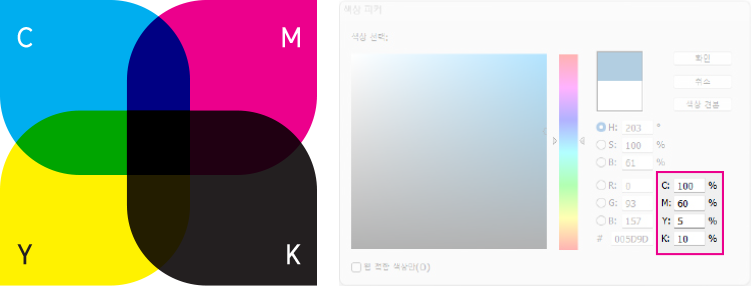
CMYK 4 Primary Colors
Within gang-run production, slight tonal variations (lighter or darker) may occur, along with minor fluctuations across the C (Cyan), M (Magenta), Y (Yellow), and K (Black) channels. This is standard industry behavior.
  • Identical source files may yield different color results depending on the substrate used and the specific production timing.
  • In gang-run production, multiple orders share a single press sheet, which inherently limits the degree of individual color calibration achievable.
  • Extensive areas of deep background color may exhibit roller marks, producing subtle surface inconsistencies.
  • Front and back surfaces may display minor tonal differences, even when identical color values are specified in the original design file.
  • For projects requiring precise color fidelity, we recommend providing a physical printed reference sample, selecting an individual-run order with press supervision, or consulting with Pluber's production support team.
  • Gang-run products include: Business Cards, Tags, Coupons, Brochures, Square-Cut Stickers, Kiss-Cut Stickers, Standard Envelopes, and Flyers.
2. Colors with closely matched CMYK ratios or sensitive tonal ranges may produce notably different printed results.
Even marginal differences in CMYK values can translate to visually distinct printed colors. Color accuracy assessments are conducted against your submitted source file, not the physical printed output.
Color variation example:
Color variation example: C=61%, M=52%, Y=52%, K=22%
3. K=100% black is processed with overprint enabled.
To prevent overprint from being applied, introduce 1% of an additional color channel to the black value, or alternatively set the value to K=99%.
Overprint K=100%
< Overprint K=100% >
No Overprint
< No Overprint >
Rich Black (C=30% + M=30%)
< Rich Black (C=30% + M=30%) >
< Overprint Examples >
4. Patterns and textures must maintain adequate contrast against the background to ensure visibility.
For optimal reproduction, we recommend establishing a minimum 20-30% color differential between pattern elements and the background.
10% Color Difference
< 10% Color Difference >
20%+ Color Difference
< 20%+ Color Difference >
< Patterns & Textures >
5. Exercise caution when composing text and lines using blended CMYK color values.
  • Minor misregistration between color separation plates may cause color bleeding or positional drift. This effect becomes increasingly visible with finer text and thinner line weights.
  • On backgrounds composed of blended CMYK values, misregistration can cause fine elements to fragment or become imperceptible.
  • For optimal legibility, black text and rules should be composed in pure black (K=100%) exclusively, avoiding mixed-color builds.
  • Regardless of whether a single color is used, extremely fine text or hairline rules may not reproduce with full clarity in the printed output.
6. Combined CMYK ink coverage must remain below 250%.
  • Elevated ink density significantly increases the likelihood of ink offset, wherein wet ink transfers onto the reverse side of adjacent sheets during stacking.
  • This can result in sheets adhering together or surface ink delamination.
  • To achieve richer dark tones, we recommend increasing the K (Black) component rather than elevating CMY channel values.
  • Subject to substrate type and print methodology, ink offset phenomena can manifest even at coverage levels below 250%.
  • Excessive ink saturation may produce muddied dark tones or visible roller impressions.
7. White ink provides semi-opaque coverage.
On transparent or translucent substrates, a degree of show-through from the underlying material is expected when white ink is applied.
Cutting
Pluber's precision cutting standards, managed under professional quality controls.
A cutting tolerance of approximately ±1-3 mm (0.039-0.118 in) is standard in the industry.
  • High-volume cutting processes inherently involve minor sheet displacement during operation.
  • To safeguard against content loss, we recommend positioning all essential text and design elements a minimum of 3 mm (0.118 in) inward from the trim boundary on all sides.
    For catalogs and pamphlets, an increased safety margin of at least 5 mm (0.197 in) on each side is recommended.
  • Due to the inherent characteristics of mechanical cutting, borders and symmetrical design elements cannot be guaranteed to align with absolute precision.
  • Minor angular deviation during cutting is a standard production characteristic.
Finishing
Pluber's premium finishing processes, executed under rigorous quality standards.
A finishing tolerance of approximately ±1-2 mm (0.039-0.079 in) is standard in the industry.
Die-Cutting and Post-Processing
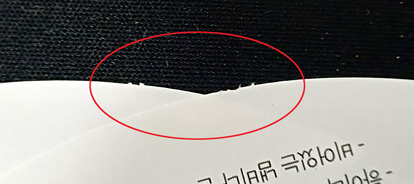
In high-speed automated die-cutting, structural nicks (connection points) are intentionally engineered along the cut perimeter to maintain product stability and prevent displacement during processing.
Example of die-cutting connection points (nicks)
  • Following the die-cutting phase, a manual finishing operation is performed to remove residual material prior to dispatch.
  • The quantity and positioning of nicks are determined by the material composition, substrate thickness, and die-cut geometry.
  • Depending on paper type, thickness, and surface coating characteristics, minor impressions may be visible along the cut edges. Heavier stock tends to produce more prominent marks.
  • These characteristics are an inherent aspect of the manufacturing process, not defects, and can be readily addressed prior to final use.
  • For flat print products including business cards, tags, and coupons, nicks will remain visible along the die-cut edges as part of the standard production process.
  • For envelopes and packaging, nicks are strategically positioned to be concealed within the assembly (gluing) areas, though some may remain visible depending on the specific product construction.
Quantity
Pluber's quantity management standards for gang-run production.
In gang-run production, a minor quantity shortfall may occur. Under typical conditions, this variance is maintained within 5%.
However, subject to specific production variables such as ink density requirements from concurrent orders sharing the same press sheet, shortfalls of up to 10% may occur in approximately 2% of orders.
  • Gang-run products include: Business Cards, Tags, Coupons, Brochures, Square-Cut Stickers, Kiss-Cut Stickers, Standard Envelopes, and Flyers.
  • Orders incorporating finishing options may experience a higher shortfall rate due to additional setup waste (makeready) required by the finishing process.
  • Should an exact quantity be essential, we recommend selecting the individual-run production option.
Cancellation & Refund Policy
Pluber's quality assurance and refund provisions for bespoke print products.
As all products are manufactured to individual specifications, refunds on the basis of a change of preference are not available once the production process has commenced.
For international orders, applicable payment processing fees and associated financial charges may be deducted from the refund amount.
To initiate a cancellation request, kindly submit a 1:1 inquiry through our website.
Prior to design preview approval
  • A complete refund will be issued.
During the production phase
  • Partial refund eligibility is assessed based on the current stage of manufacturing.
Prior to dispatch
  • Only the shipping fee component is eligible for refund.
Software Configuration Guide
InDesign InDesign
Document Configuration
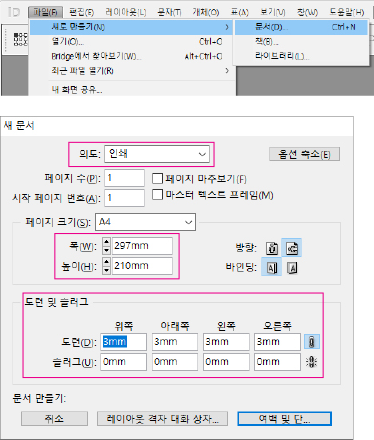
Initialize a new document configured for your print product specifications. Define the trim size as the page dimensions, and configure the bleed settings to accommodate the design size.
File → New → Document (Ctrl+N)
Intent: Print | Page Size: A4 (210×297mm) | Bleed: 3mm (all sides) | Slug: 0mm
Document Configuration
Safety Margin Configuration
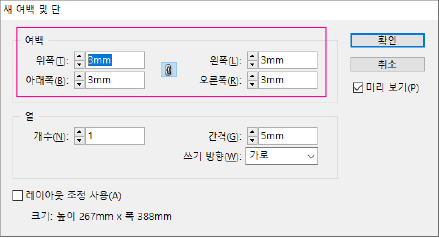
Establish safety margins to protect essential content from the trimming process. We recommend 3mm for compact products (business cards, tags, coupons) and 5mm or greater for larger format items (flyers, pamphlets, catalogs).
Layout → Margins and Columns
Margins: 3mm (all sides)
Safety Margin Configuration
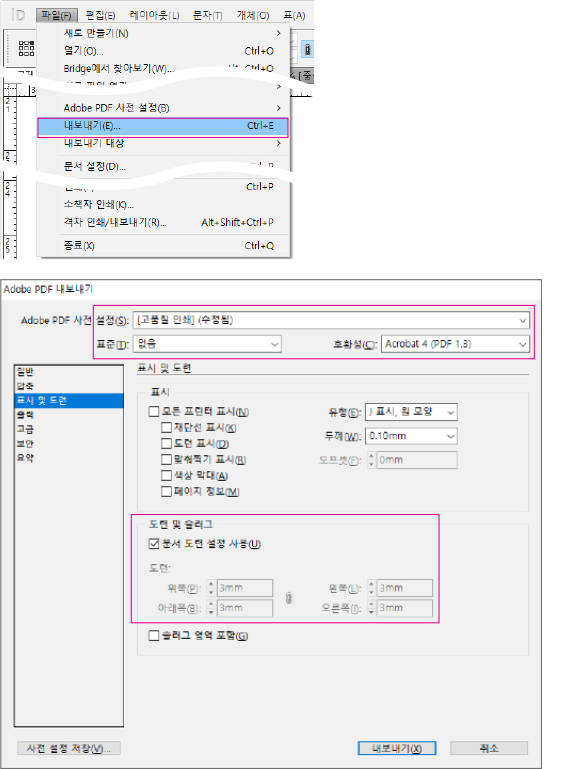
PDF Export
Upon completing your design, export to PDF using the following configuration.
File → Export (Ctrl+E)
Format: Adobe PDF (Print) | Preset: PDF/X-4:2008 | Marks and Bleeds: Use Document Bleed Settings
PDF Export
Illustrator Illustrator
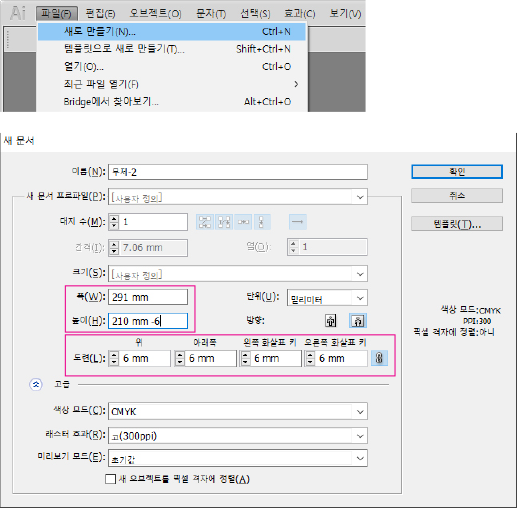
Document Configuration
Initialize a new document configured for your print product specifications. Define width and height based on the safety zone dimensions. Add 3mm to each side for the trim size (when using a 3mm safety zone). Include 6mm for bleed (accounting for the 3mm safety zone). We recommend 3mm for compact products and 5mm or greater for larger format items.
File → New (Ctrl+N)
Width: 297mm, Height: 210mm + 6mm | Bleed: 6mm (all sides) | Color Mode: CMYK | Raster Effects: High (300 ppi)
Document Configuration
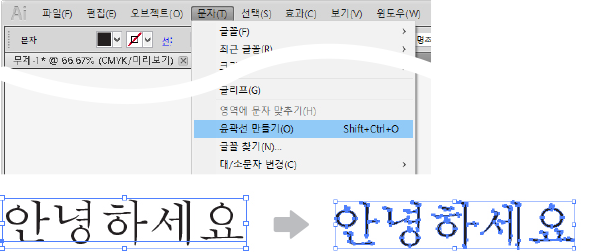
Convert Text to Outlines
All typographic elements must be converted to vector outlines prior to submission.
Type → Create Outlines (Shift+Ctrl+O)
Convert Text to Outlines
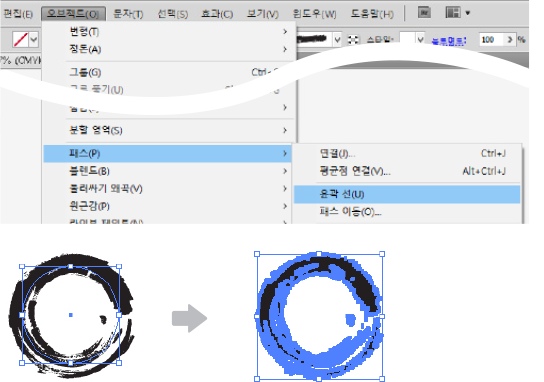
Convert Strokes to Outlines
All strokes must be converted to outlined vector paths.
Object → Path → Outline Stroke
Convert Strokes to Outlines
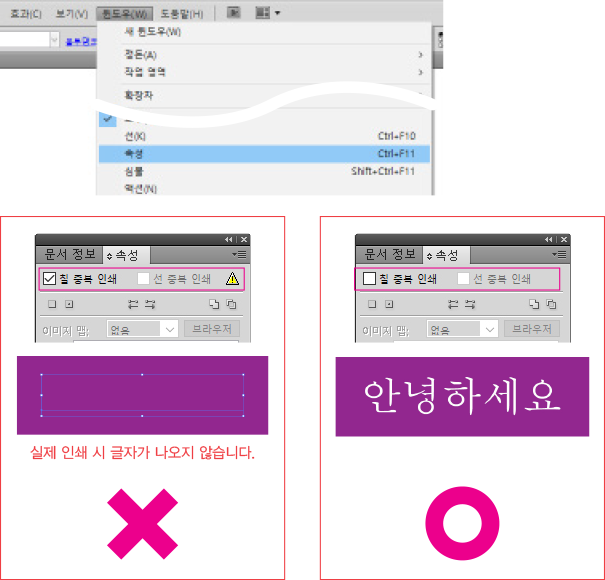
Overprint Configuration
Please verify that overprint is disabled for both fill and stroke attributes.
Window → Attributes (Ctrl+F11)
Overprint Fill: unchecked | Overprint Stroke: unchecked
Overprint Configuration
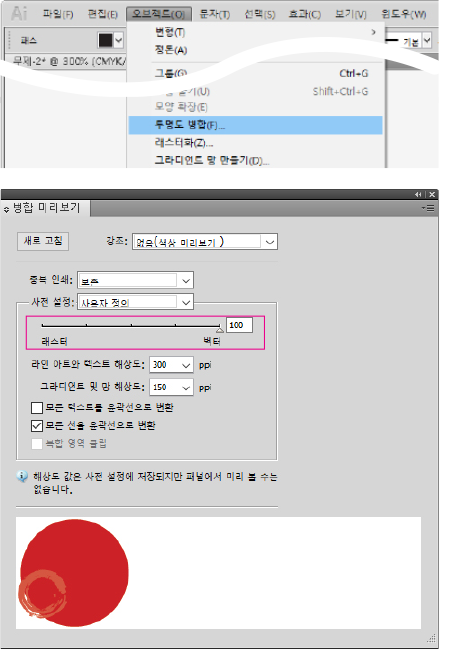
Flatten Transparency
All objects utilizing transparency effects must be flattened (Vector 100%) prior to submission.
Object → Flatten Transparency
Raster/Vector Balance: 100 (Vector) | Line Art and Text Resolution: 300 ppi | Gradient and Mesh Resolution: 150 ppi | Convert All Strokes to Outlines: checked
Flatten Transparency
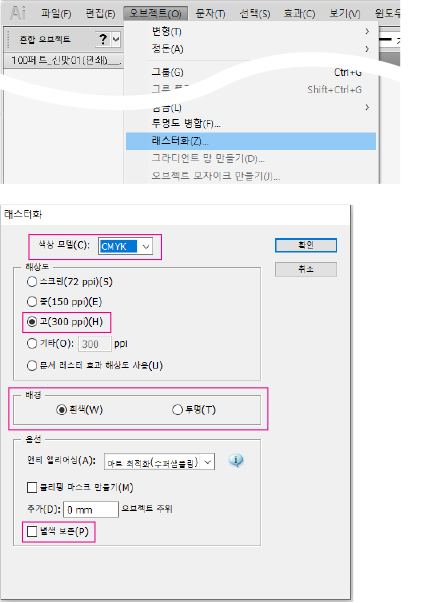
Rasterize Effects
Gradient fills, transparency effects, and other complex visual treatments must be rasterized (converted to bitmap imagery).
Object → Rasterize
Color Model: CMYK | Resolution: High (300 ppi) | Background: White / Transparent
Rasterize Effects
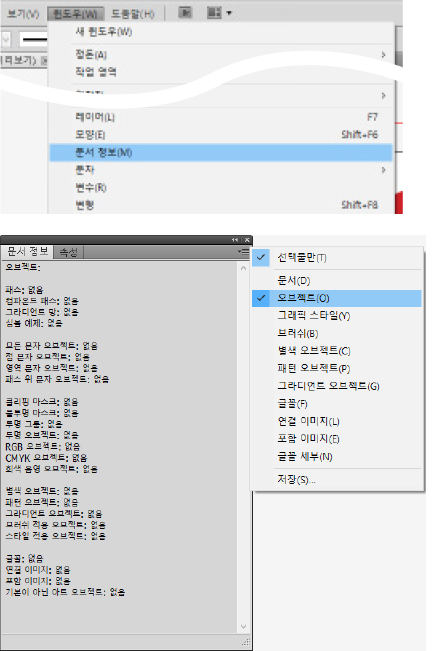
Verify Document Information
Utilize the Document Info panel to identify potential print production issues. Select Objects from the panel menu. All categories should display 'None' to confirm error-free status. If numerical values appear, locate and resolve those objects using the procedures described above.
Window → Document Info
Panel menu (☰) → Objects
Verify Document Information
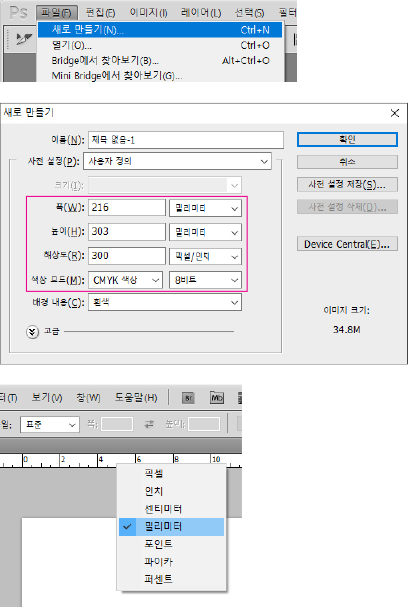
Photoshop Photoshop
Document Configuration
Initialize a new document configured for your print product specifications. Resolution must be set to a minimum of 300 pixels/inch, and the color mode must be configured as CMYK. Please note that low-resolution source material cannot be improved by adjusting resolution settings retroactively. If your source artwork is low resolution, it will need to be recreated using high-resolution assets.
File → New (Ctrl+N)
Width: 216mm, Height: 303mm | Resolution: 300 Pixels/Inch | Color Mode: CMYK Color, 8 bit | Background Contents: White
Right-click ruler → Millimeters (or Edit → Preferences → Units & Rulers)
Document Configuration
KR South Korea
Korea
KR South Korea
North America
US United States
CA Canada
East Asia
JP Japan
TW Taiwan
MN Mongolia
Southeast Asia
ID Indonesia
SG Singapore
MY Malaysia
TH Thailand
VN Vietnam
PH Philippines
BN Brunei
KH Cambodia
LA Laos
South Asia
IN India
BD Bangladesh
PK Pakistan
LK Sri Lanka
NP Nepal
MV Maldives
Western Europe
GB United Kingdom
DE Germany
FR France
IT Italy
ES Spain
NL Netherlands
CH Switzerland
BE Belgium
AT Austria
IE Ireland
PT Portugal
LU Luxembourg
Northern Europe
SE Sweden
NO Norway
DK Denmark
FI Finland
EE Estonia
LT Lithuania
LV Latvia
Eastern Europe
PL Poland
CZ Czech Republic
HU Hungary
RO Romania
SK Slovakia
BG Bulgaria
MD Moldova
Southern Europe
GR Greece
SI Slovenia
HR Croatia
CY Cyprus
BA Bosnia and Herzegovina
AL Albania
MK North Macedonia
Oceania
AU Australia
NZ New Zealand
MU Mauritius
FJ Fiji
Middle East
SA Saudi Arabia
TR Turkey
AE United Arab Emirates
QA Qatar
KW Kuwait
BH Bahrain
OM Oman
JO Jordan
LB Lebanon
EG Egypt
South America
BR Brazil
MX Mexico
AR Argentina
CL Chile
CO Colombia
PE Peru
EC Ecuador
PA Panama
CR Costa Rica
DO Dominican Republic
UY Uruguay
PY Paraguay
BO Bolivia
Africa
ZA South Africa
MA Morocco
NG Nigeria
KE Kenya
GH Ghana
TZ Tanzania
ET Ethiopia
UG Uganda
DZ Algeria
TN Tunisia
ZM Zambia
MZ Mozambique
DJ Djibouti
Central Asia
KZ Kazakhstan
UZ Uzbekistan
AZ Azerbaijan
GE Georgia
AM Armenia
KG Kyrgyzstan
South America
JM Jamaica
TT Trinidad and Tobago
GT Guatemala
BS Bahamas
BB Barbados
BM Bermuda
KY Cayman Islands
Southern Europe
RS Serbia
MT Malta
Northern Europe
IS Iceland
Western Europe
LI Liechtenstein
MC Monaco

Amount Due

Calculating...

PLABER

  • Company : PLABER Co., Ltd., Customer Service : +82-2-6677-7332
  • Address : 70 Dusan-ro, Geumcheon-gu, Seoul 08595, Korea
  • CEO : Eun-Sun Ha
  • Business No. : 337-86-03597
  • Sales License : 신청 중
  • Privacy Officer : Eun-Sun Ha, Email : cs@pluber.com

Copyrightⓒ2021 (C)PLABER All Rights Reserved.

HENEX - AI Print Consultant
Hello! I'm HENEX, your AI print consultant. 👋
Ask me about quotes, product specs, order tracking, and more.

💡 Conversations are used for AI learning and service improvement.
⚠️ Do not enter personal info (email, phone, address, name, ID, card number, etc.). It may be sent to AI.
🏷️ Sticker/Label
📄 Flat Print
💼 Cards/Coupons
✉️ Envelope/Package
📘 Books/Catalogs
🖼️ Large Format
📦 Order/Inquiry
⚠️ Do not enter personal info (name, phone, email, address, etc.).